From the bookingto the bill.
subba takes your table bookings and your orders, from the table, your website and the phone, and runs them through the kitchen to the table or the door. Your team sign in to see the orders, clock in for their shifts and book their holidays. You see what sells.
Fill the tables. Keep the kitchen calm.
Guests book online, by chat or by phone, and get a table that fits, at a time the kitchen can handle.
Bookings by party size
Guests say how many are coming and get the smallest table that seats them.
Joined tables
For big groups, subba books tables you have said can be pushed together.
Kitchen pace
Set how many people can arrive in each window, so the kitchen gets a steady flow, not a rush.
Deposits for big tables
Take a deposit per head, or only from a group size you choose, paid straight to your Stripe.
Payment links
Ask for a deposit or a payment from the booking in your calendar. The link goes by email, and by text with the texts add-on.
Tonight's tables
Every table on one screen. Seat a walk-in in seconds and mark who turned up.
Reminders
A reminder the day before, and another on the day if you like, so fewer tables sit empty.
From the table, the phone and your website.
One menu, with your sizes and extras priced in, everywhere guests order.
Ordering at the table
Every table gets its own QR code. Guests order from their phone, and the order arrives with the table's name and, if you ask, how many are at it.
Or one code for the whole place
Put a single QR code on the wall or the menu. Guests type their table number and order.
On your own website
Put your menu and ordering on a page of your own website with one line of code, or the
[subba_order]shortcode in our WordPress plugin. Guests order there and come back to the same page after paying, with their order confirmation. It sits in your page's column or runs the full width.Menu sections
Starters, mains, drinks: guests jump to the part of the menu they want, in the order you set.
Looks like your restaurant
Pick one of seven styles, then your colours and lettering, a picture of each dish and your menu in tabs like Food and Drinks, wide enough to sit on your website. Your web designer can add their own CSS to match your brand exactly.
Allergens on every dish
Tick which of the 14 major allergens each dish contains, and guests see them before they order.
Offers and codes
A happy hour on cocktails, or 10% off a first order with a code. Offers run on the days and times you set, and show on your order page and in the emails you send customers.
Takeaway and collection
Collection times from your opening hours, a limit per time so the kitchen keeps up, and delivery if you offer it, to the postcodes you choose.
Notes for the kitchen
Guests add requests like "no onions", and the kitchen sees them on the order.
Phone orders Extra
The AI phone line takes takeaway orders from your menu and books tables, day and night.
A chat that knows your menu
The AI chat on your website answers questions about your dishes and prices, knows what is sold out and sends people the link to order. Allergy questions go to your team.
One menu, three designs.
The same made-up menu on the same order page, three ways: a style picked in the dashboard, then a few lines of CSS from a designer. Choices can sit on each dish, a pizza can be built in steps, the details can have a checkout page of their own, and Stripe's payment page takes the same colours. Your designer can match your website exactly, from a mock-up or a Figma file. See how it works.
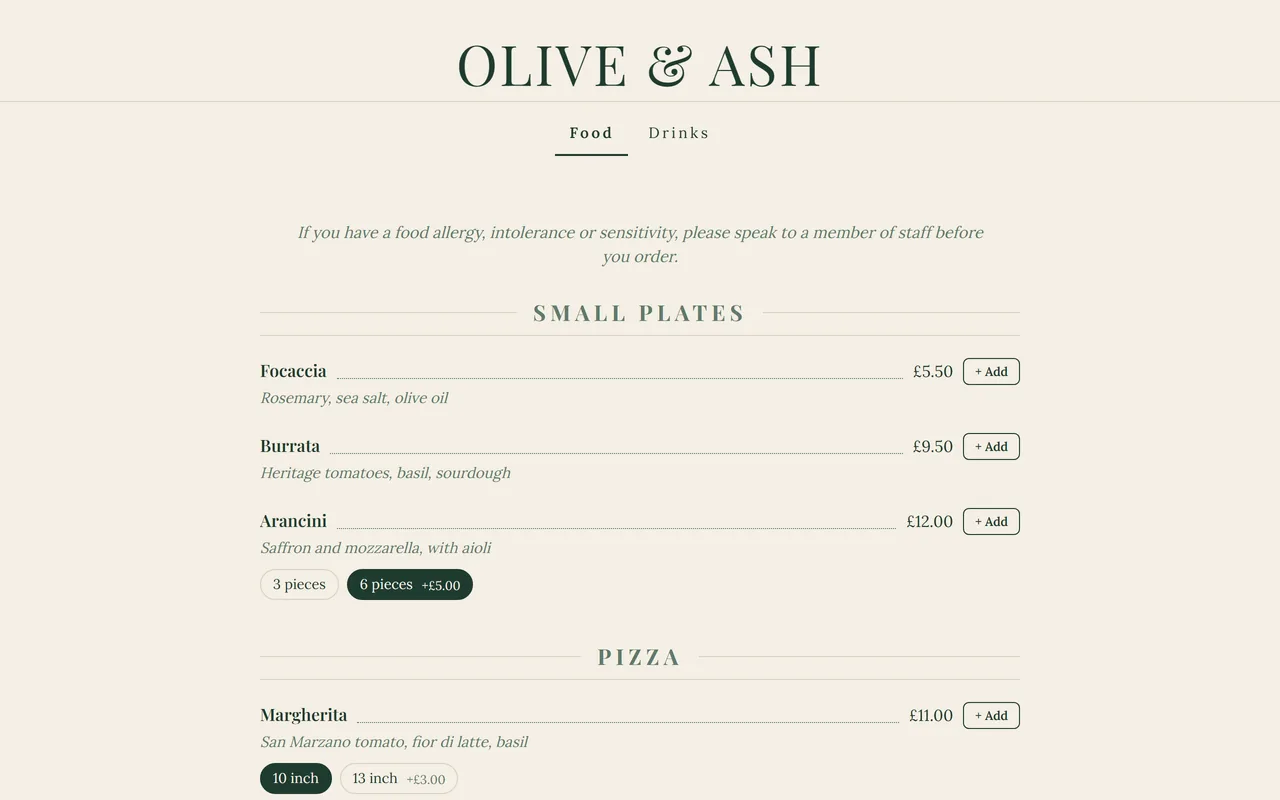
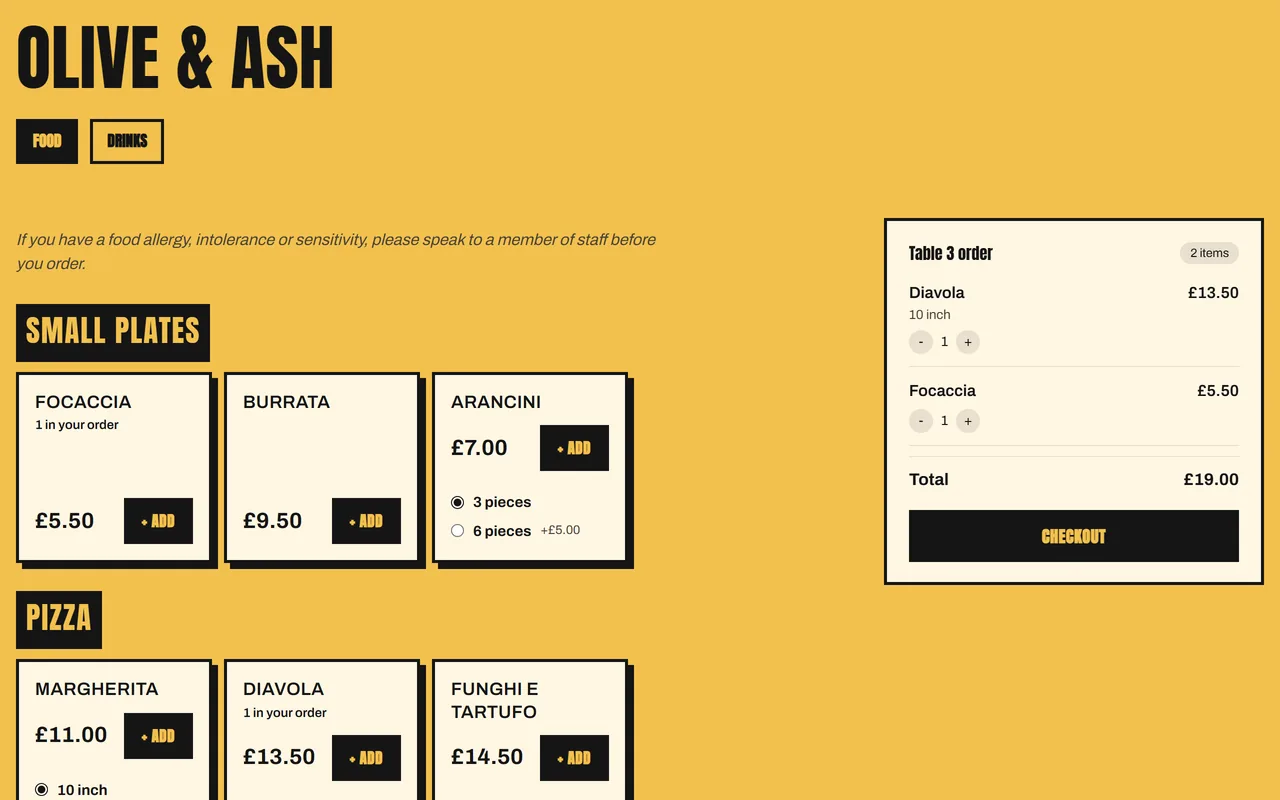
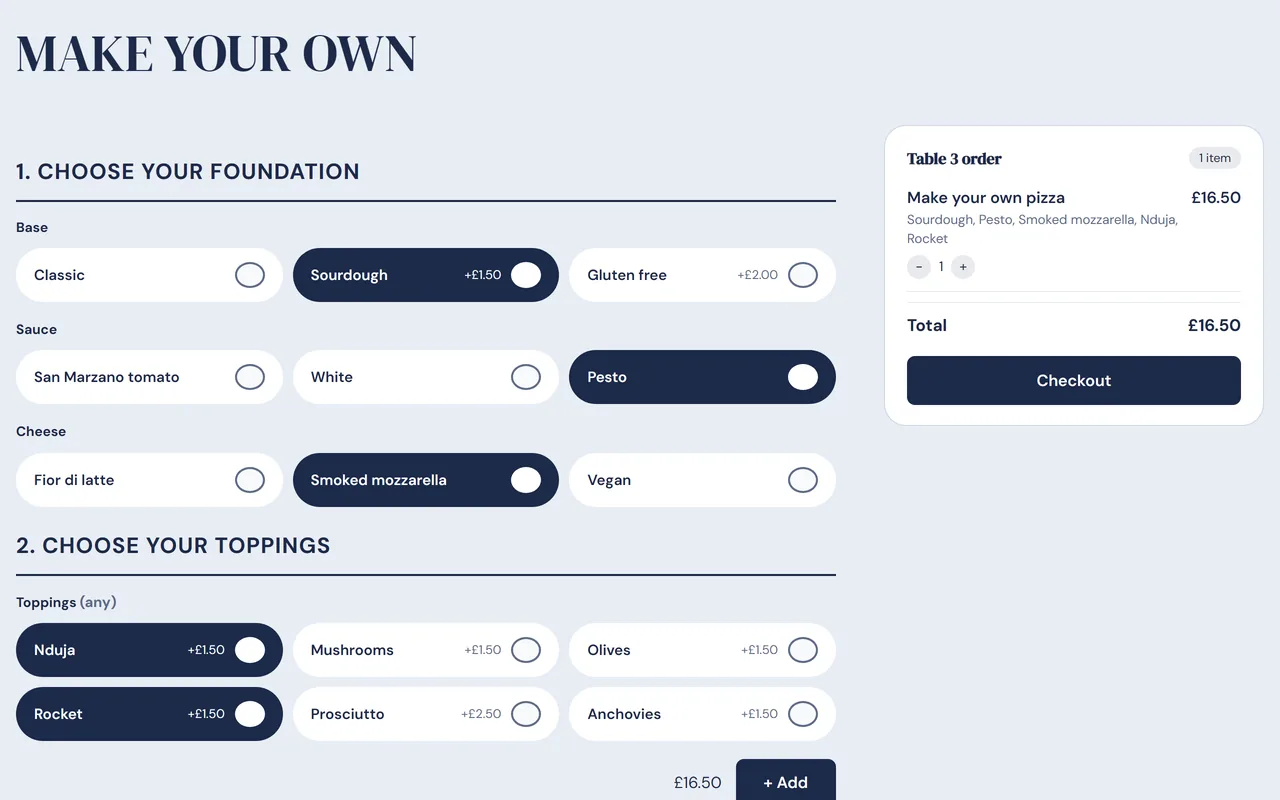
Example designs, with a made-up restaurant and menu.
Every order, from new to served.
One board for the whole team, up to date on every screen without anyone refreshing.
Running orders
New, in the kitchen, ready, then served or collected. Your team move each order along in a tap.
Kitchen screen
Open a private link on a tablet in the kitchen, a kitchen display with no hardware to buy. Staff type the screen password once on each tablet. It chimes for each new order, and can alert the tablet even with the screen off.
A screen for the bar
Drinks go to the bar's screen and food to the kitchen's. The bar can mark a whole order served.
Who is on it
Each order shows who took it, who made it ready and who handed it over.
Order alerts
New orders go to the kitchen's email, and can pop up on your team's phones, each with an order number.
Sold out, in a tap
Mark a dish sold out for tonight, or until you say. Guests cannot order it, and the phone line stops offering it.
Pause online orders
Kitchen full? Pause collection, delivery and phone orders for 15, 30 or 60 minutes. Tables carry on ordering.
Split it, tip it, and go.
Guests pay from their own phones when they are ready, straight to your Stripe account.
Pay as they order, or at the end
Your choice: guests pay by card when they order, or pay the table's bill from their phone when they are ready.
Split the bill
Guests pay it all, split it evenly or pay a set amount. Two guests can never pay for the same share.
Tips for your team
Let guests add a tip as they pay, kept apart from the bill. Each table shows who served it, and each month you see who gets what, with a download for payroll. Your team see how tips are shared, never what anyone else got.
A service charge, if you want one
Offer an optional service charge on every table, or from a table size you choose. Guests see it on their order or their share of the bill, and can take it off. It goes to your team like a tip.
Table bills
Each table's bill builds up as they order, with what is paid and what is left. Your team close it once they have gone.
Logins, a rota and timesheets.
Everyone who works a shift, front and back of house, in the same place as the orders.
Staff and manager logins
Your team sign in to see the orders and their shifts, never your takings or settings. A manager runs the day without seeing your billing.
Weekly rota
Plan who works when, with holidays shown on it and a warning for long shifts with no break. Copy last week's rota in one click, and staff get an email when their shifts change.
Clock in and out
Staff clock in and out from their phone, and see their shifts for this week and next.
Timesheets
Hours worked against the rota. Fix a missed clock-out, and download the week for payroll.
Holidays
Staff ask for time off and you approve it, with each person's allowance tracked, or holiday built up from the hours they work. See the staff rota app.
See what sells, and when.
The numbers behind every order, ready the moment you sign in.
Sales
Sales day by day, with orders and the average order against the period before.
Best sellers
Your most popular dishes, and the sizes and extras people pick.
Busiest hours and days
When the orders come in, so you can plan the rota around them.
Kitchen times
How long orders take to be ready, and how many are ready on time.
Your team
Who handled what, next to the hours they worked.
Yesterday, by email
Turn on a morning email with yesterday's sales, best sellers and bookings, and sales and orders against the same day the week before.
Before you switch.
Do I need any special kit?
No. The kitchen screen opens in the browser on any tablet or phone, and guests order and pay on their own phones. Print the QR codes for your tables straight from subba.
Can guests order on our own website?
Yes. Add one line of code, or our WordPress plugin, and your menu and ordering sit on your own page, in your style. Guests pay by card on Stripe's secure checkout and come straight back to your page with their confirmation.
Can guests pay from the table?
Yes. You choose: guests pay by card as they order, or pay the table's bill from their phone when they are ready. Payments go straight to your own Stripe account.
Can guests split the bill and leave a tip?
Yes, when they pay from their phones. Guests pay it all, split it evenly or pay a set amount, and add a tip if you allow tips. Or offer an optional service charge instead, which guests can take off. Tips and service charge are kept apart from the bill, so you can pass them on to your team.
How do tips and service charge reach my team?
By law they all go to your team, shared fairly, by the end of the month after. subba notes who served each table and, each month, shows who gets what: to whoever served each table, or shared by the hours each person worked. You get a download for payroll and a statement for anyone who asks. Your team can read how tips are shared, but never what anyone else got.
Does subba take a cut of my orders?
No. subba takes no fee on your orders or bookings. Card payments go through your own Stripe account at Stripe's standard rates.
We are a takeaway with no tables. Does it still fit?
Yes. Collection and delivery ordering, the running orders, the kitchen screen, the rota and the insights all work without table bookings.
What can my staff see?
Staff sign in to see the running orders and their own shifts and holidays. They never see your takings, your settings or your customer records.
More on QR code ordering, the kitchen display and the staff rota app. Run a cafe? See subba for cafes.
Free for
30 days.
then from £9.99/m
Every feature on this page from day one, apart from the extras marked Extra. The plan costs nothing until day 30, cancel in one tap.